
Multi-Location Google Business Profiles for Franchisees Who Own Several Units
Multi-location Google Business Profiles for franchisees who own several units — operator playbook for eligibility, NAP, reviews, and unit-level Maps ops.
If you own several franchise units, Google Business Profile (GBP) stops being “set up the listing and forget it.” You’re managing a small portfolio of Maps presence — each with its own address truth, phone, hours, reviews, photos, and verification history — under one brand.
I’ve sold franchise units myself and I’ve helped a lot of multi-unit operators (typically 2–10 units) keep local demand from getting messy. The pattern I see: owners treat GBP like a single-location chore times N, or they let corporate “handle listings” without a unit-level ops sheet. That usually creates duplicate profiles, mixed phone numbers, review blind spots, and suspensions that take weeks to unwind.
This playbook is GBP operations only — for multi-unit franchisee operators who already own the locations. For paid search/Meta geo and budgets across units you own, use our multi-unit franchise advertising playbook. For Local Service Ads eligibility, routing, and unit budgets, see Google LSA operations across several locations. Those are complementary channels. This page stays on Maps / Business Profile ops.
We’re not rewriting local franchise marketing ideas lists or a generic local SEO checklist. The job here is how you run GBP when you own several units.
Why Multi-Unit GBP Is Different When YOU Own the Locations
When corporate owns hundreds of locations, GBP is a platform problem. When you own 2–10 units, GBP is an operator problem:
- You (or your GM) live the phone tree, the hours exceptions, and the angry review.
- One weak unit’s rating still colors how customers talk about “the brand” in your metro.
- Acquisitions, remodels, and “we might sell Unit 4 next year” force handoff decisions corporate templates don’t cover.
- Ads, LSA, and the website all want clean per-unit NAP (name / address / phone) — GBP is usually the source of truth customers trust first.
Shared ownership also creates a false sense of safety. Operators assume, “I own all three, so Google will treat them as one business.” It won’t. Each profile is scored and policed as its own location. Your org chart is irrelevant to Maps until the NAP, categories, hours, and proof match that location.
What “good” looks like for a multi-unit owner is boring on purpose: every unit has a claimed profile, a short list of managers who still work there, a phone that humans answer, hours that match the door, photos that look like that building, and a review SLA someone owns.
[Universal] Google evaluates each profile as a real business location. Shared ownership does not give you permission to invent storefronts, share one address across units, or recycle a verified profile for a different site.
[Confirm with your franchisor] Who is allowed to claim, edit, and transfer GBP managers; required business-name format; and whether brand requires centralized admin access.
One Profile Per Real Location: Eligibility, Storefront vs Service-Area, Address and Phone Rules
Start with a blunt rule: one Google Business Profile per real operating location you can prove. A shared brand name is not a substitute for a real address, real hours, and real customer-facing presence.
| Unit | Primary category | Storefront or service-area? | Public address | Phone | Website / landing URL | Hours match ops? | Verification | Notes |
|---|---|---|---|---|---|---|---|---|
| Unit 1 | Set | Choose one model | Documented | Unique / approved | Unit URL | Y/N | Verified / pending / failed | |
| Unit 2 | Set | Choose one model | Documented | Unique / approved | Unit URL | Y/N | Verified / pending / failed | |
| Unit 3 | Set | Choose one model | Documented | Unique / approved | Unit URL | Y/N | Verified / pending / failed |
Decision points that trip multi-unit owners:
- Storefront vs service-area. If customers visit you, you generally need a public address. If you go to them and hide the address, service-area rules apply — and inventing a fake suite to “get on the map” is how suspensions start.
- Address truth. Suite numbers, shared retail pads, and “use the warehouse” tricks create duplicate and verification risk. If two units share a parking lot but have distinct customer entrances and ops, treat them as distinct locations unless brand legal says otherwise and Google’s model matches that reality.
- Phone. Prefer a stable, unit-true number that matches how you answer. Random tracking swaps without a NAP plan confuse Maps and customers. If Unit 2’s GBP rings a call center that doesn’t know which unit the customer is near, you’ve bought confusion.
- Acquired units. The old owner’s profile may still exist, unclaimed, or claimed by someone who left. Inventory every Maps result for the brand + address before you create anything new. Creating first and cleaning later is how you manufacture duplicates.
- Remodels and temporary closures. Update hours and posts on the same profile. Don’t open a temporary second listing “for the pop-up window.”
[Universal] Don’t create a second profile “just in case,” and don’t point two units at one address.
[Confirm with your franchisor] Approved NAP format vs the corporate directory, whether tracking numbers are allowed on GBP, and who owns the listing if you exit the unit.
Naming, Categories, and Brand Consistency Without Looking Like Duplicates
Brand consistency and “looking like spam duplicates” are different problems. Google cares whether profiles represent distinct places. Customers care whether Unit A and Unit B feel like the same trustworthy brand.
Practical naming habits for multi-unit owners:
- Follow the brand’s legal / DBA pattern exactly — including city or neighborhood modifiers only when the brand standard allows them.
- Keep primary categories aligned unit-to-unit unless a location truly offers a different primary service mix.
- Secondary categories can reflect real local offerings; don’t keyword-stuff every unit with every service the brand has ever sold.
- Descriptions: shared proof points + local facts (parking, neighborhoods served, team) beat copy-paste walls of keyword spam.
- Attributes and services lists should match what that unit can actually fulfill this month — not what the brand brochure promised nationally.
If two of your units show up next to each other in Maps with near-identical names, photos, and descriptions, that can still be fine when the addresses are distinct and true. What gets you in trouble is sameness plus weak address/phone differentiation, or keyword-stuffed names that look like spam clones.
[Confirm with your franchisor] Exact business-name string, logo, and category shortlist. If corporate pushes a naming change network-wide, schedule it — don’t freelance Unit 7 overnight.
[Universal] Keyword-stuffed names (“Best HVAC Near Me — Brand — City”) and near-identical profiles for the same address are classic duplicate / policy failure modes.
Reviews Ops Across Units: Request, Respond, Escalate — and How One Bad Unit Hurts the Brand
Reviews are location-level assets with portfolio-level consequences. Prospects often read two or three of your units before they call any of them.
Run reviews like operations:
- Request: Who asks, on which completed jobs, within what time window — per unit.
- Respond: Owner or manager SLA for positives and negatives (same-day / 48-hour — pick one and measure it).
- Escalate: Safety, legal, discrimination, or brand-risk complaints leave the unit manager’s inbox on a written path.
- Coach: A unit stuck at 3.6 stars with slow replies is an ops problem first, a “GBP SEO” problem second.
- Compare fairly: Don’t beat up a 90-day-old acquisition for not matching a five-year unit’s review velocity. Do beat it up for unanswered 1-stars.
One unit with ignored 1-star reviews can poison brand searchers in the whole DMA even when your other units are at 4.8. Don’t average the pain away in a blended dashboard — fix the unit. If Unit 5’s service failure is a staffing issue, buying more ads into Unit 5 (see the multi-unit ads playbook) just amplifies the reputation problem.
[Confirm with your franchisor] Approved response templates, banned admissions, and when corporate communications must take over.
Photos, Hours, Posts, Products/Services — What to Centralize vs Keep Local
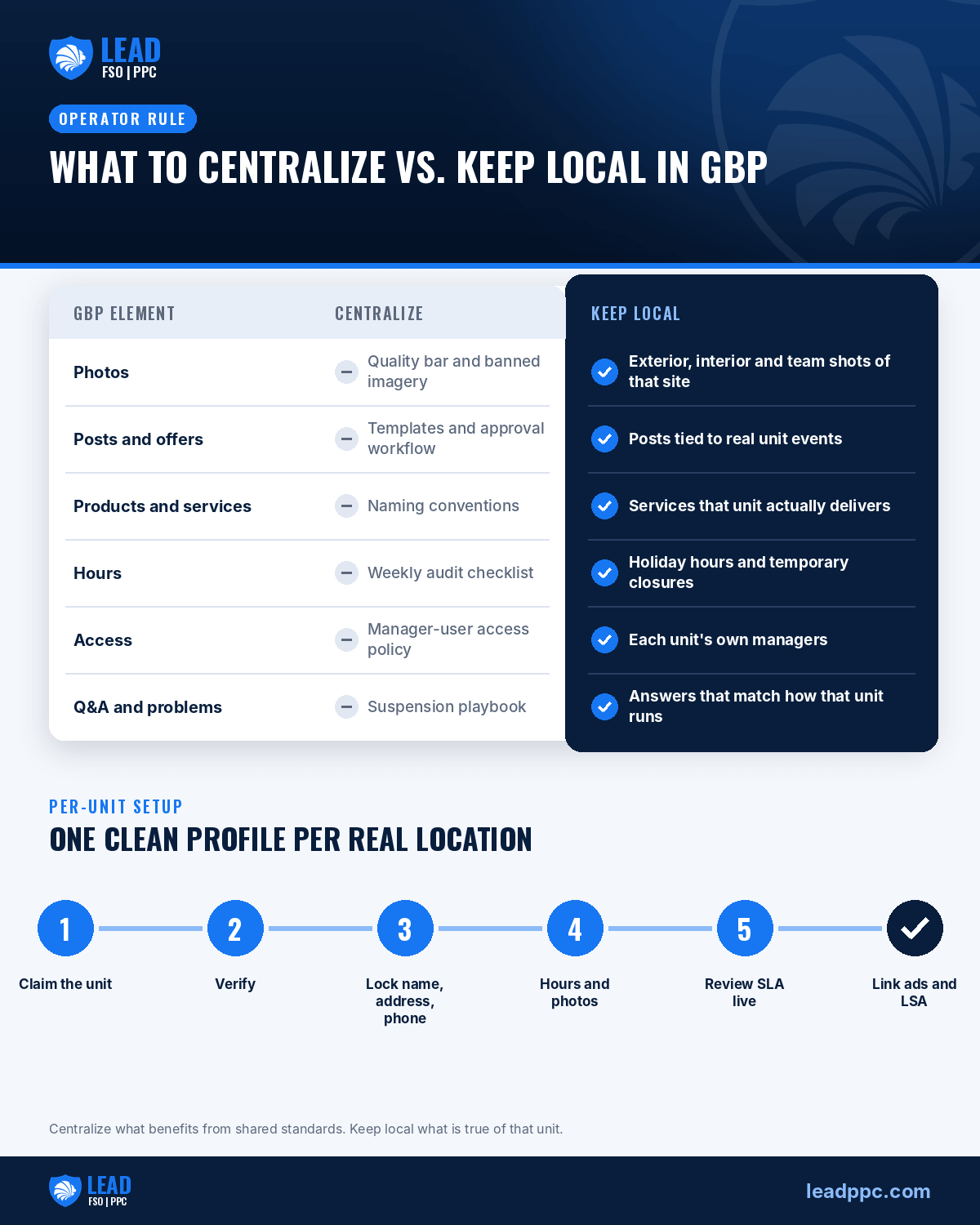
Same organizing rule as multi-unit ads: centralize what benefits from shared standards; keep local what is unit-true.
Centralize (operator / brand layer)
- Photo quality bar and banned imagery
- Post templates and offer approval workflow
- Products/services naming conventions
- Weekly audit checklist and KPI pack
- Manager-user access policy
- Crisis / suspension playbook (who files what)
Keep local (per unit)
- Exterior / interior / team photos of that site
- Holiday hours, temporary closures, remodel notes
- Parking, entrance, and accessibility details
- Local posts tied to real unit events
- Services actually fulfilled at that unit’s capacity
- Q&A answers that match how that unit operates
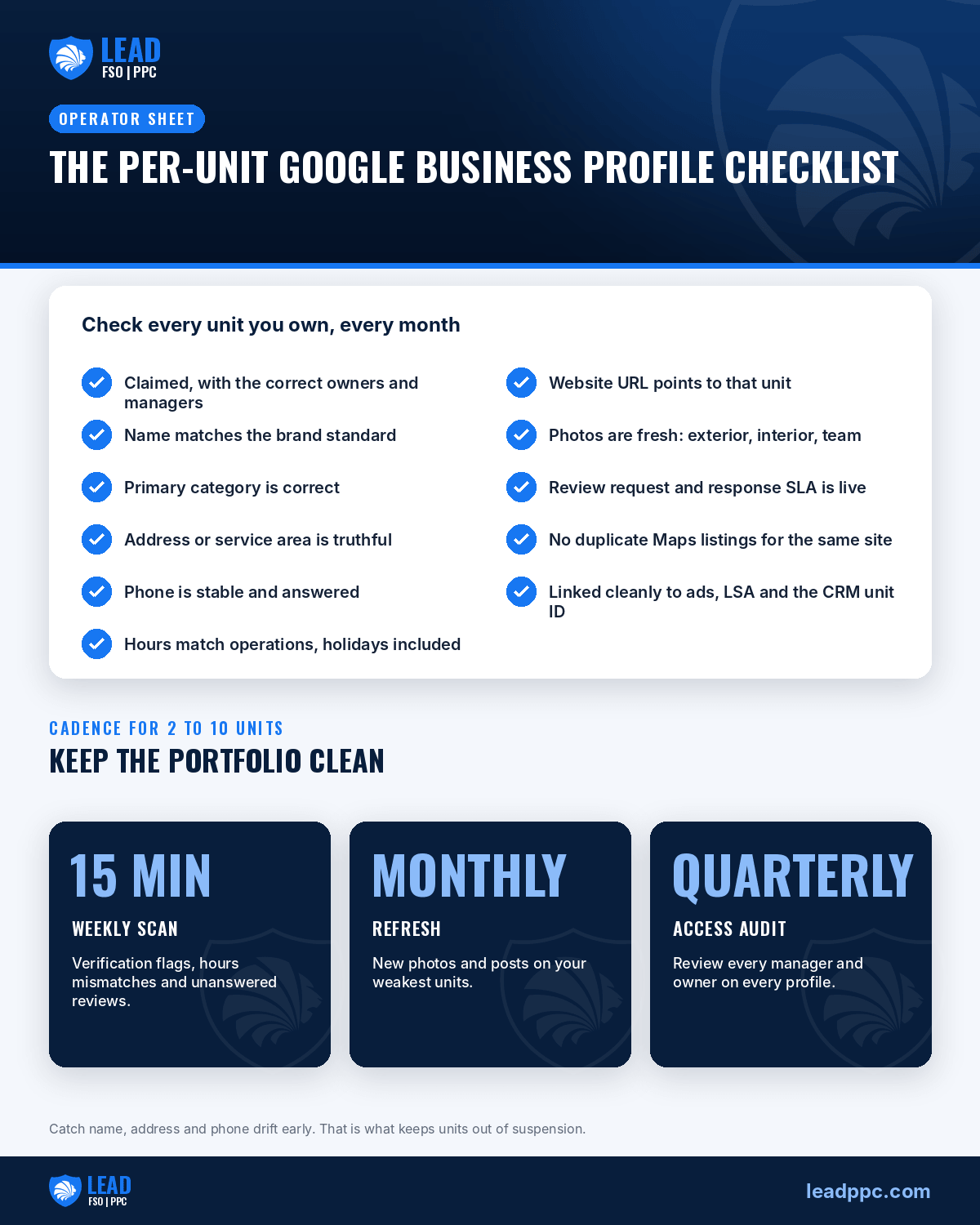
A useful cadence for 2–10 units: weekly 15-minute portfolio scan (verification flags, hours mismatches, unanswered reviews), monthly photo/post refresh on the weakest units, quarterly manager-user audit. You’re not trying to “out-SEO” corporate. You’re trying to stop easy losses.
[Confirm with your franchisor] Creative and offer approval SLAs. If approval takes three weeks, batch posts — don’t let Unit 2 go dark while Unit 5 waits on a headline.
Linking GBP to Ads, LSA, and Website Tracking Without Mixing Units
GBP, Google Ads location assets, LSA, and your site should agree on which unit is which. Mixing units is how dashboards lie.
Minimum hygiene:
- Each GBP website URL points to the correct unit landing page (or brand-approved locator behavior).
- Phone on GBP matches the number you intend customers to call for that unit — don’t silently rotate tracking numbers without a NAP policy.
- Ads location extensions / assets and LSA profiles should map to the same real locations as GBP — not a blended “metro” fiction.
- CRM fields: unit, source, campaign/profile, disposition — so a Maps call and an LSA call don’t both get credited as whatever unit answered last.
- UTM or landing rules that preserve unit identity when someone clicks from Maps to the site.
Deep dives on the paid side live in the multi-unit advertising playbook and LSA operations playbook. For Search tactics outside Maps ops, local franchise PPC is the channel companion. Light SEO context (not a substitute for this SOP) sits in franchise SEO ideas.
[Universal] Call-recording and SMS consent rules vary by state. If tracking crosses state lines, use a clear announcement and get counsel to review all-party-consent exposure.
[Confirm with your franchisor] Whether tracking numbers may appear on GBP / web / LSA without breaking directory NAP standards, and who owns the customer record.
Suspension, Duplicate, and Verification Failure Modes — and How Operators Recover
Multi-unit portfolios see the same failure modes on loop:
| Failure mode | Typical trigger | Operator recovery posture |
|---|---|---|
| Duplicate | Re-created profile after acquisition; old unclaimed listing still live | Claim or request merge/remove; don’t keep posting to both |
| Verification failed / stuck | Docs don’t match address entity; mailbox issues; prior owner still listed | Fix entity/address proof; use brand-approved legal name; document chain of ownership |
| Suspended | Policy, fake address, keyword name, or contested ownership | Stop “quick new profile” recreates; assemble proof; appeal with consistent NAP |
| Edit wars | Ex-employee, landlord, or prior owner still a manager | Audit users; remove stale managers; lock who can invite |
Recovery habits that save weeks:
- Keep a folder per unit: lease/utility proof, license, photos of signage, prior verification mail if any, list of managers.
- When you acquire a unit, make “Maps inventory + ownership transfer” a closing checklist item — same priority as utilities and POS.
- If Google asks for video or document verification, film that address and door, not a prettier sister unit across town.
[Universal] Creating a fresh profile to dodge a suspension often makes the duplicate problem worse. Fix the authoritative listing.
[Confirm with your franchisor] Whether brand legal or a designated vendor must file appeals, and what proof packets they already keep for each site.
When to Consolidate vs Keep Separate (Adjacent Units, Acquisitions, Soon-to-Sell)
| Situation | Default | Why |
|---|---|---|
| Two real storefronts, even if close | Keep separate | Distinct customer-facing places |
| One unit acquired mid-year | Keep separate; reclaim/repair that unit’s listing | Don’t clone another unit’s profile |
| Unit you plan to sell in 12–24 months | Keep separate with clean manager handoff plan | Buyer needs a detachable asset |
| Truly one operating site that was split into two profiles by mistake | Consolidate to the accurate listing | Duplicates hurt Maps trust |
| Service-area business with overlapping polygons, no public address | Still one profile per legitimate business presence your docs support — not “one mega profile for the metro” | Simplifying admin is how you invent presence |
Adjacent units you own are still separate places if customers experience them as separate. Consolidating to “make reporting easier” is almost always the wrong trade. Same for “we’ll just use Unit 1’s profile until Unit 2 verifies” — that shortcut becomes a year-long mess.
If you are preparing a unit for resale, treat GBP managers, review history, and phone portability as part of diligence — not as an afterthought the week before closing.
Per-Unit GBP Checklist (Operator Sheet)
| Checklist item | Unit 1 | Unit 2 | Unit 3 |
|---|---|---|---|
| Claimed + correct owners/managers | |||
| Name matches brand standard | |||
| Primary category correct | |||
| Address / service area truthful | |||
| Phone stable + answered | |||
| Hours match ops (incl. holidays) | |||
| Website URL unit-correct | |||
| Photos fresh (exterior/interior/team) | |||
| Review request + response SLA live | |||
| No duplicate Maps listings for same site | |||
| Linked cleanly to ads/LSA/CRM unit ID |
Print this (or put it in your ops wiki) and review it monthly. The operators who stay out of suspension hell are the ones who catch NAP drift early — not the ones who “optimize categories” every other week.
ChatGPT now has its own business profiles, too. Once each unit’s GBP is clean, claim it there with our ChatGPT business profiles playbook for franchise locations, using the exact same name, address, phone and hours.
FAQs
Can I run one Google Business Profile for every unit I own?
No — not if those are separate real operating locations. One profile per legitimate location is the operating assumption.
What if two units sit a mile apart in the same metro?
Keep separate profiles, separate phones/hours/photos, and a review ops plan for each. Proximity is not a merge reason.
Should the GBP phone be my call-tracking number?
Only inside a written NAP policy your franchisor accepts. Stability and answer rate beat clever tracking every time.
Who should respond to reviews — corporate or the unit manager?
Usually the unit manager with a brand escalation path. Corporate sets standards; the local operator owns the reputation.
We bought a unit and Maps still shows the old owner. Now what?
Inventory claims and duplicates first. Reclaim or request ownership transfer with proof — don’t create a second profile on day one.
Need Help?
If you would like to speak with us about multi-location Google Business Profile operations for the units you own — eligibility, NAP hygiene, reviews ops, and clean links to ads/LSA — please fill out our Contact Us form.
We can also tie GBP into the wider multi-unit stack (Search, LSA, tracking, and capacity-aware allocation) without turning this into another generic local SEO ideas list.

Entrepreneur with a focus on Lead Generation, Google Adwords, Bing Ads, and Conversion.





Leave A Comment