
Google LSA Lead Credits for Franchisees: How Automatic Credits Work and What to Do About Bad Leads
Google LSA Lead Credits for Franchisees: How Automatic Credits Work and What to Do About Bad Leads.
Key Takeaways
- Google replaced manual Local Services Ads disputes with automatic LSA lead credits in 2024. Its models review leads and credit the ones they judge invalid or low quality.
- Credits usually post within 30 days, and the original charge still shows on the invoice.
- Google no longer credits “job type not serviced” or “geo not serviced” leads, so your service settings must be exact for every unit.
- Rate every lead in the LSA dashboard. Google says lead feedback helps it understand which leads you want.
- Track LSA leads to booked jobs by unit so you know your true cost per job after credits.
Here’s the conversation I have with franchisees every month. “We paid for a call from someone two counties over who wanted a service we don’t do. Where’s the dispute button?” There isn’t one anymore. Google moved Local Services Ads to automatic lead credits, which means the way you protect your LSA budget has changed.
For a multi-unit franchisee, with several LSA profiles, overlapping service areas and a shared call center, the new system rewards accurate settings and steady feedback, and punishes sloppy setup. This guide explains how LSA lead credits work now and what operators should do about bad leads.
A note on rules: Google updates LSA policies, credit rules and eligibility often, and your franchise agreement may control who owns and manages each unit’s LSA account. Confirm current details in Google’s Local Services help center and check with your franchisor before changing settings.
How LSA Lead Credits Work Now
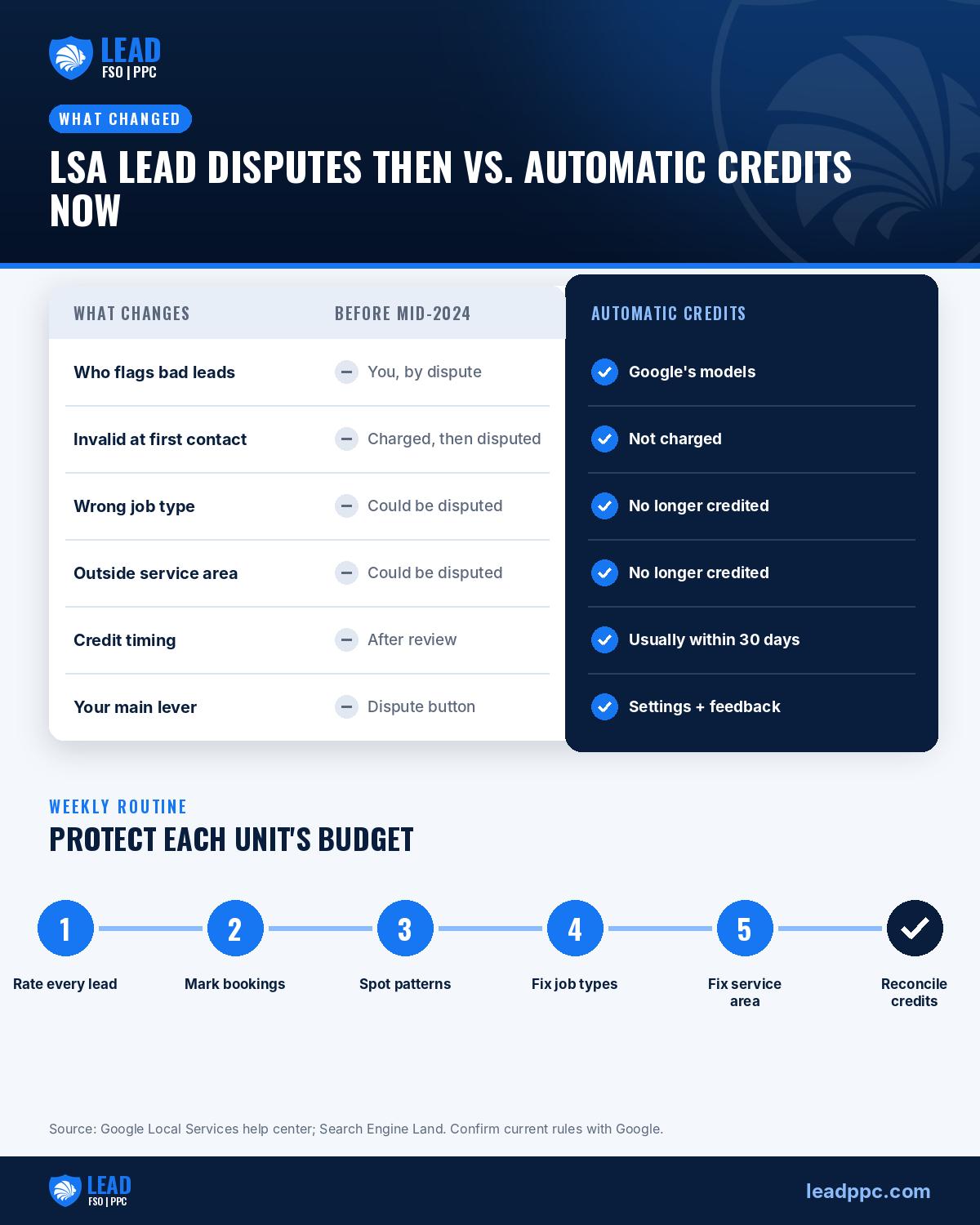
Google announced automated lead credits for Local Services Ads in mid-2024, replacing the old manual dispute process. Google said a small number of advertisers had been disputing a large share of leads while most disputed none, and that more leads would be credited on average under the automated system.
What Google says happens to each lead:
- At first contact, leads Google judges invalid or low quality aren’t charged.
- After you’re charged, Google’s models keep reassessing leads and may credit them automatically if they’re later judged low quality.
- Timing: in most cases credits are applied to your account balance within 30 days, and the original charge still appears on the invoice.
- Bonus credits: Google’s lead reports note that some credits can come as a bonus for leaving lead feedback.
Your LSA lead report now splits leads into not charged, charged, in review and credited, so you can see where every lead landed.
What Google No Longer Credits
This is the change that hurts franchisees most. Google’s help center says it no longer supports credits for “job type not serviced” or “geo not serviced” leads.
That means if your settings say a unit offers a service or covers a ZIP code, Google treats leads for that service or area as fair game. The fix is in your setup:
- Job types. Turn off every job type a unit doesn’t perform, or doesn’t want, before the leads come in.
- Service areas. Set each unit’s service area to its franchise territory, not “everywhere we’d drive.”
- Overlap. Where units border each other, make sure each profile only covers its own territory. Our guide to territory overlap in franchise ads covers how.
- Hours. Keep business hours accurate so calls don’t come in when nobody can answer.
Google notes that changing service areas, job types and categories can reduce the number of leads you receive. That’s the point: fewer, better leads cost less than more leads you can’t serve.
What Franchisees Have Seen Since the Switch
Not everyone is happy. In early 2025, local SEO expert Darren Shaw reported a run of out-of-industry and out-of-area LSA leads with no way to dispute them, and said agencies managing hundreds of businesses had seen lead quality decline. Google’s Ads Liaison, Ginny Marvin, responded that Google credits more leads overall than it did under manual disputes, and that disputes had been underused by most advertisers and overused by a few.
For operators, the practical takeaway is simple: you can’t argue a lead back anymore, so you need clean settings, consistent feedback and your own tracking to know what LSA really costs.
Rate Every Lead and Track It to a Booked Job
Lead feedback. In the LSA dashboard, open Leads, choose a lead and use “Rate this lead” to complete the feedback survey. Google calls this feedback crucial to understanding your preferences.
- Make it a daily task. Assign one person per unit, or your call center, to rate every lead.
- Mark bookings. Mark leads as booked in the dashboard when they book.
- Record why. Tag bad leads in your CRM by reason: wrong service, wrong area, spam, existing customer, no answer.
Your own tracking. Google’s credits are a black box, so measure outcomes yourself.
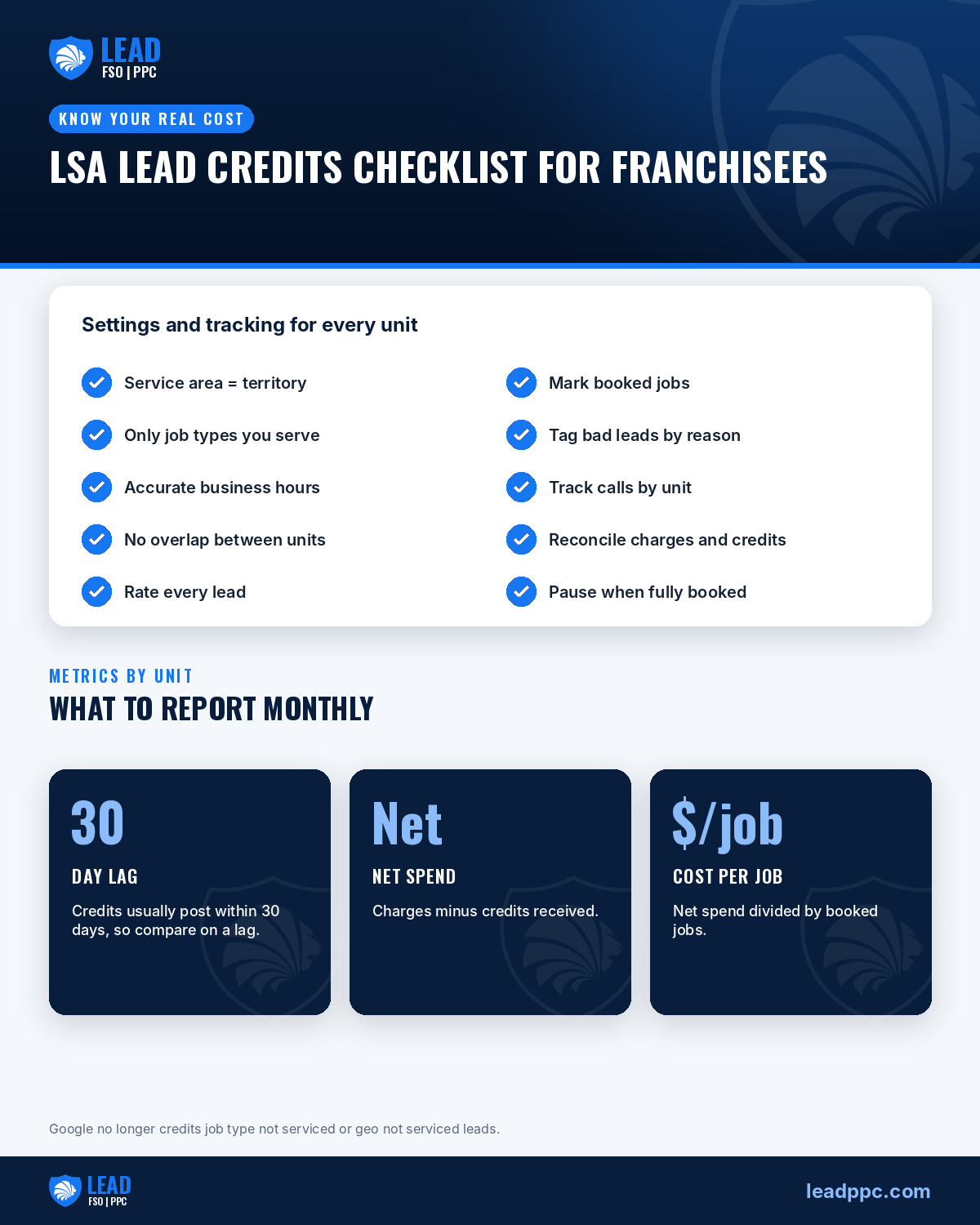
| Metric | How to calculate it, by unit |
|---|---|
| Net LSA spend | Charges minus credits received for the month |
| Credit rate | Credited leads ÷ charged leads |
| Bad-lead rate | Leads your team tagged bad ÷ all leads |
| Booking rate | Booked jobs ÷ charged leads |
| Cost per booked job | Net LSA spend ÷ booked jobs |
Because credits can take up to 30 days, compare months on a lag. Our multi-unit call tracking and offline conversion tracking guides show how to tie leads to jobs.
A Weekly LSA Routine for Multi-Unit Franchisees
- Monday: review last week’s leads by unit. Check that every lead has been rated.
- Look for patterns. If one unit keeps getting the same wrong job type or area, fix the setting that day.
- Check budgets and pausing. Pause or lower budgets for units that are fully booked rather than paying for leads you can’t serve. See franchise lead capacity planning.
- Monthly: reconcile charges and credits on the invoice and update cost per booked job.
- Quarterly: review reviews, response times and profile details, since they affect where your ads show.
When LSA Isn’t Paying Off
If a unit’s cost per booked job keeps rising after settings and feedback are clean, don’t just keep paying.
- Narrow the service area to the ZIP codes that book.
- Cut low-value job types that attract shoppers you rarely convert.
- Shift budget to Google Search ads, Google Business Profile work or other channels where you control keywords and negatives.
- Check the phones. Missed calls and slow call-backs make good leads look bad.
Frequently Asked Questions
Can you still dispute Google LSA leads?
Google replaced manual LSA lead disputes with automatic lead credits in 2024. Its models review leads and credit the ones they judge invalid or low quality, so the main tools left to advertisers are accurate settings and lead feedback.
How long do LSA lead credits take?
Google says that in most cases credits are applied to your account balance within 30 days. The original lead charge still appears on your invoice, so reconcile charges and credits monthly.
Why wasn’t I credited for a lead outside my service area?
Google’s help center says it no longer credits geo not serviced or job type not serviced leads. Set each unit’s service area and job types exactly to what that unit serves, so those leads stop coming in.
Does rating leads in LSA help?
Google says lead feedback helps it understand your preferences, and some credits can be issued as a bonus for leaving feedback. Rate every lead and mark booked jobs in the dashboard.
How should a multi-unit franchisee measure LSA?
Track net spend after credits, credit rate, bad-lead rate, booking rate and cost per booked job for each unit, and compare months on a lag because credits can take up to 30 days.
Need Help?
If your units are paying for LSA leads they can’t serve, credits are hard to reconcile, or you want a clear cost per booked job by location, fill out our Contact Us form.
Lead PPC has served 500+ franchise brands and managed $50M+ in franchise ad spend across Google, Meta and LSA. We can audit each unit’s LSA settings, set up lead feedback and tracking, and help you spend where jobs actually book.

Entrepreneur with a focus on Lead Generation, Google Adwords, Bing Ads, and Conversion.
Leave A Comment