
Offline Conversion Tracking for Multi-Unit Franchise Ads: Feed Closed-Won Into Google Bidding
Offline conversion tracking for multi-unit franchise ads: feed booked jobs into Google bidding.
Key Takeaways
- If Smart Bidding only sees form fills and calls, it optimizes for whoever is easiest to get a form from, not for booked jobs. Offline conversion imports close that gap.
- Pick one primary imported conversion, usually a booked job or sold estimate, and use it consistently across every unit. Keep form fills and calls as secondary.
- Capture the click ID (GCLID, plus GBRAID or WBRAID when present) and a unit ID on every lead, and store them in your CRM with the lead’s email and phone.
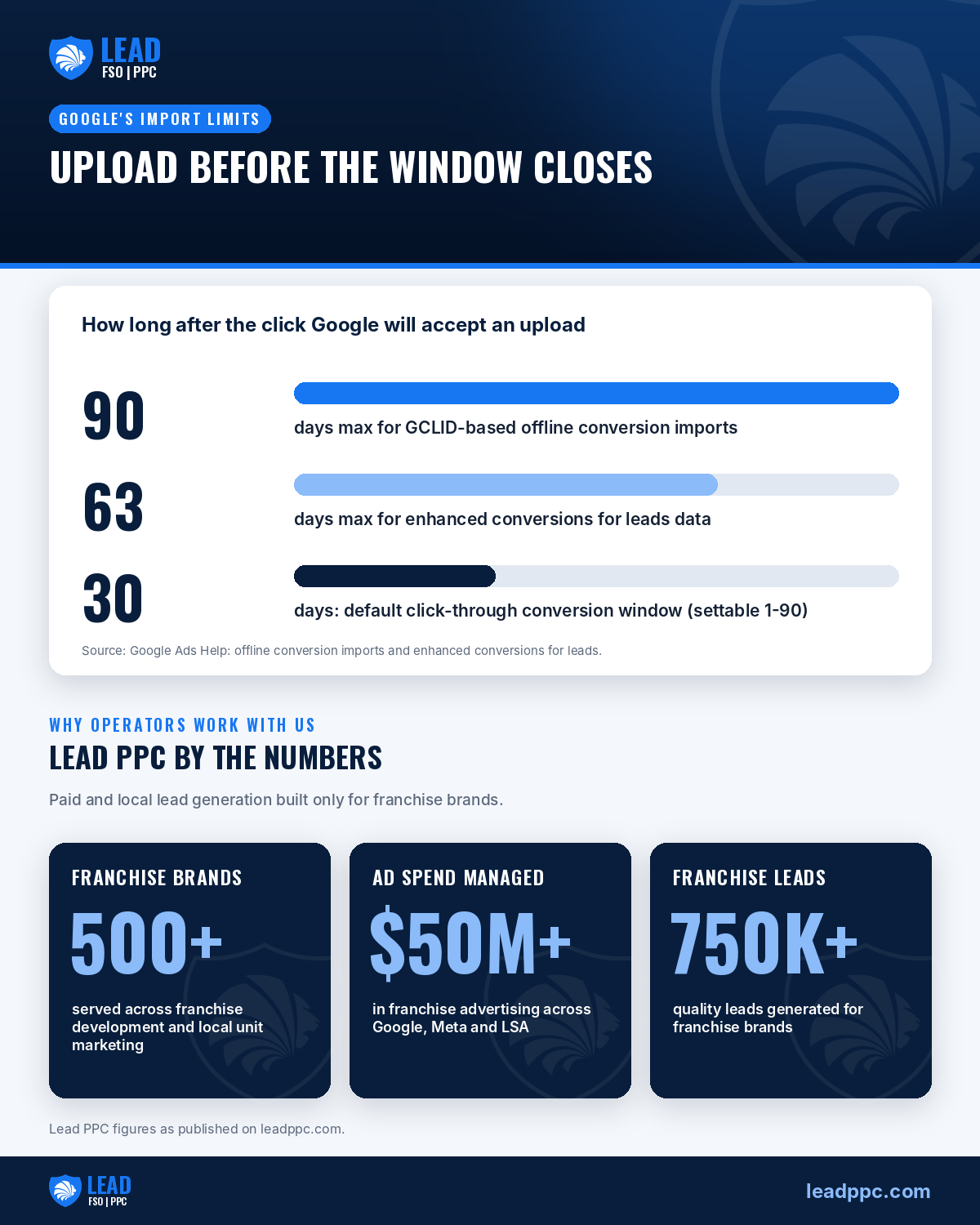
- Google won’t import a click-based conversion uploaded more than 90 days after the click, or more than 63 days for enhanced conversions for leads. Upload at least weekly, ideally daily.
- A Google Sheet on a scheduled upload is enough for most operators. You don’t need a data warehouse.
- The expensive failures are duplicate imports, credit landing on the wrong unit, and uploading to an account that didn’t own the click.
Here’s the gap in most multi-unit franchise accounts. A lead fills out a form on Monday. Google counts a conversion and Smart Bidding learns from it. On Thursday, your office finds out the lead was outside the territory, wanted a price for a service you don’t offer, or never picked up. Meanwhile, the lead that became a large booked job looks exactly the same to Google as the tire-kicker.
Offline conversion tracking sends what happened after the lead back to Google Ads, so bidding learns from booked jobs instead of form fills. Across several units, with multiple phone lines, a shared CRM, and maybe a franchisor-run brand account in the mix, it takes planning. This guide covers the operator setup.
A note on rules: Google changes conversion import features and upload methods regularly, and your franchise agreement may govern who owns customer data. Confirm current details in Google’s help center and check with your franchisor before uploading customer data.
Form-Fill Optimization vs. Closed-Won Reality
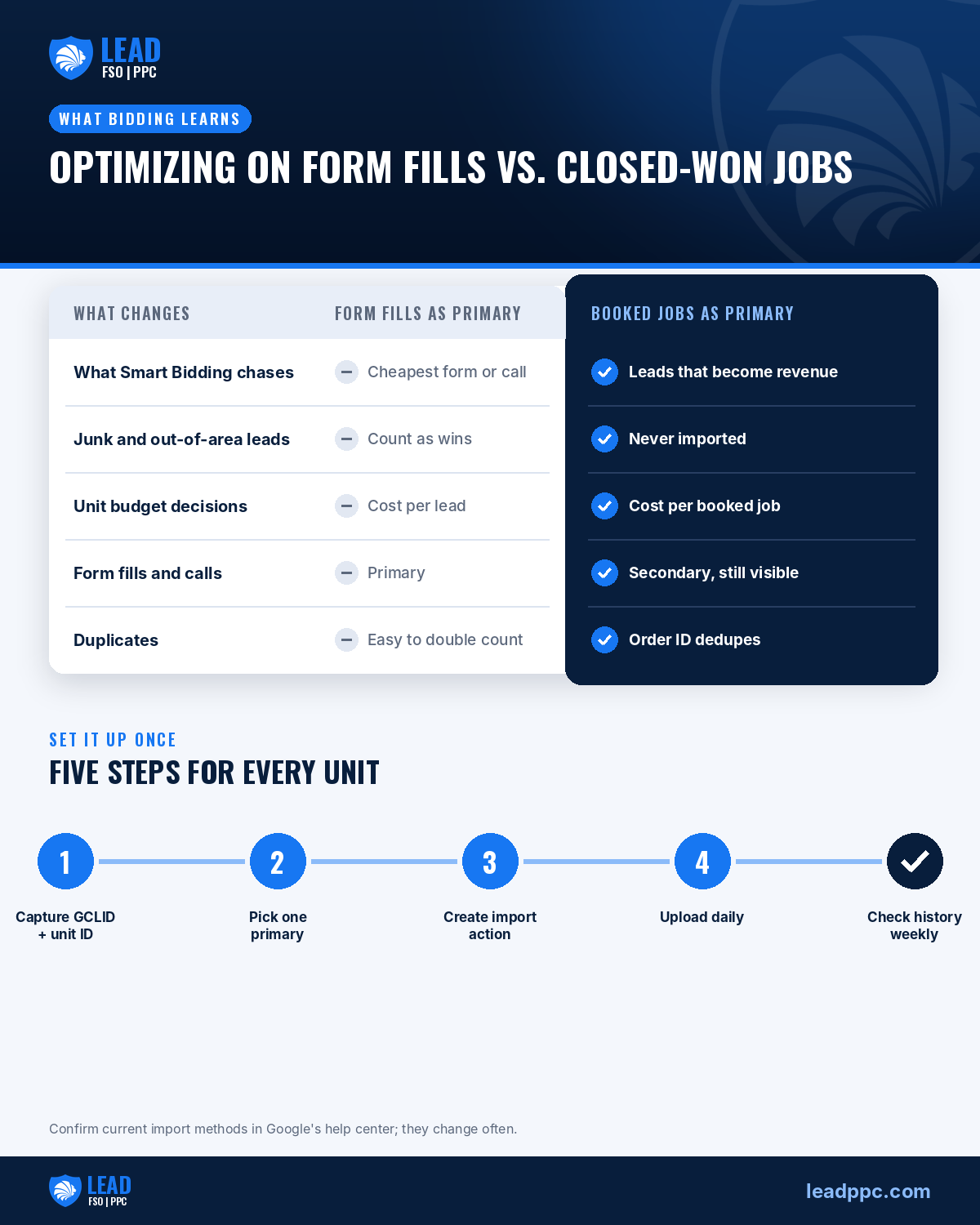
Smart Bidding optimizes toward whatever you mark as a primary conversion. If that’s a form fill or a 30-second call, Google will find more form fills and calls, including the cheap, low-intent ones. It has no way to know which leads became revenue unless you tell it.
In multi-unit accounts the problem compounds:
- A unit with a lot of junk leads looks efficient on cost per lead and gets more budget.
- A unit whose leads close well but cost more per lead looks expensive and gets cut.
- Spam and out-of-area leads count the same as real ones.
Importing closed-won outcomes fixes the feedback loop. It doesn’t replace a clean intake process or a good multi-unit call tracking setup, but it lets bidding and budget decisions run on the number you actually care about: cost per booked job by unit.
What to Import: Booked Job, Sold Estimate, or First Appointment
Import the event closest to revenue that still happens reliably within Google’s import window, and make it the one primary conversion for every unit. For most home-service franchisees that’s a booked job or a sold estimate. For longer sales cycles, the first kept appointment is often the better primary.
| Event | Use as primary when | Watch out for |
|---|---|---|
| First appointment (kept) | Sales cycles are long, or estimates close weeks or months later | “Scheduled” isn’t “kept”; only import appointments that actually happened |
| Sold estimate | You quote first and customers sign later (remodels, installs, larger jobs) | Needs a clear sold status and date in the CRM |
| Booked job | Most jobs book within days of the lead (repairs, cleaning, recurring service) | Define “booked” once: scheduled with a date, not just “interested” |
Rules that keep this clean across units:
- One primary, everywhere. Every unit imports the same event under the same conversion action name. If Unit 2 imports booked jobs and Unit 5 imports sold estimates, your cross-unit comparisons and portfolio bidding stop meaning anything.
- Everything else is secondary. Keep form submissions and calls as secondary conversions so you can still see them without Smart Bidding optimizing toward them. Google’s call import guide warns that counting the same call in two actions included in “Conversions” double-counts it in bidding.
- Values are optional but useful. If jobs vary a lot in size, send a conversion value, such as the estimate or invoice amount, or consistent relative values by job type. Only send numbers your CRM actually records.
Mapping Click IDs Across Units and Phone vs. Web Leads
Every lead needs two things attached before it hits the CRM: the Google identifier that ties it to an ad interaction and a unit ID that says which location owns it. Web forms and phone calls get those identifiers in different ways, so plan for both.
Web leads
When someone clicks your ad, Google appends a click identifier to the landing page URL. That’s usually a GCLID. On some iOS traffic, Google may pass GBRAID or WBRAID instead or alongside it. Google’s setup guides describe capturing these from the URL, storing them in a cookie or local storage, and passing them through hidden form fields into your CRM. Specifics:
- Store GCLID, GBRAID, and WBRAID in separate fields, exactly as received. They’re case-sensitive.
- Add a hidden unit_id field on every form, set by the location page or by the ZIP the customer enters, not by whoever answers first.
- Capture email and phone in the same record. Enhanced conversions for leads uses hashed versions of that data to match conversions when a click ID is missing.
Google now recommends enhanced conversions for leads over legacy GCLID-only imports for new setups, and it’s pushing uploads toward its Data Manager. If you’re starting fresh, set up the Google tag to collect user-provided data on your lead forms and include GCLIDs in your uploads whenever you have them.
Phone leads
Calls are where multi-unit tracking usually breaks. Two options scale:
- Google call conversion imports. For calls through Google forwarding numbers on call assets or your website, you can import outcomes using the caller’s phone number and call start time.
- Call tracking software. Many call tracking platforms capture the visitor’s GCLID through dynamic number insertion and push qualified or booked calls back to Google Ads. If you run one stack across units, this is usually the cleanest path. Confirm what your provider supports.
Local Services Ads leads come through Google’s own lead system, not a click on your landing page, so they don’t carry a click ID into your CRM. Track them in LSA and on your scoreboard as their own channel. Our LSA operations guide covers that side.
Which account owns the click
A conversion can only be imported to the account whose ad got the click, or to the manager account above it when cross-account conversion tracking is on. Google says that when you use cross-account conversion tracking, you create the import conversion actions in the manager account and upload there. If you don’t, the actions live in each account, but you can still upload through the manager. Settle your account structure first; our multi-unit franchise advertising playbook covers the one-account vs. per-unit choice.
CRM and Sheet Workflows Without a Data Warehouse
Most multi-unit operators can run offline conversions from their CRM or field-service software plus a Google Sheet on a scheduled upload. You need a consistent export, not a data engineering team. Three paths, simplest first:
- Scheduled Google Sheet. Export closed-won leads from your CRM into a sheet that uses Google’s template (click ID, conversion name, conversion time with time zone, and optional value). Google Ads can pull from the sheet on a schedule you set.
- Native or connector integrations. Google’s Data Manager supports some CRM connectors directly, and Google documents Zapier as a third-party option when your CRM isn’t supported. Check what your CRM offers before building anything custom.
- API. For larger groups with a developer. Google has announced that offline conversion and enhanced conversions for leads uploads move to the Data Manager API, so check current guidance before building.
In a sheet setup, use one tab per conversion action, not per unit; Google places each conversion from the click, and the unit stays in your CRM for your own reporting. Suggested CRM fields:
| Field | Why it matters |
|---|---|
| unit_id | Your reporting and budget decisions by location |
| gclid / gbraid / wbraid | Ties the outcome to the ad click; separate columns |
| email, phone | Enhanced conversions for leads matching when the click ID is missing |
| lead_created_at, booked_at | Conversion time and window checks |
| order_id (CRM job or lead ID) | Deduplication and later adjustments |
| job_value | Optional conversion value |
Cadence: upload daily if you can, weekly at minimum, with an extra day of overlap each time, and check upload history for errors weekly. Allow 24–48 hours for processing, and validate with the “All conv. (by conv. time)” column. For more on CRM choices, see our guide to CRMs for franchises.
Conversion Windows and Upload Timing by Franchise Type
Match the conversion window to how long your leads typically take to close, within Google’s limits. The click-through window can be set from 1 to 90 days, depending on the conversion source, and defaults to 30. Separately, Google won’t import GCLID-based conversions uploaded more than 90 days after the click, and enhanced conversions for leads data has a 63-day limit.
- Home-service franchisees: Repairs and recurring service often book within days, so a 30-day window usually covers them. Installs and remodels with longer estimate cycles may need 60–90 days, or a primary conversion that happens earlier, like a kept appointment.
- QSR and retail franchisees: Most revenue happens at the counter and never enters a CRM, so click-based imports rarely fit. Where they do, as with catering or large event orders, those usually close fast and a short window works.
Two timing rules matter more than the window setting. First, the import conversion action has to exist before the clicks you want to import, so create it before you start collecting. Second, if your real close usually lands after day 90, don’t fight the limit. Import an earlier milestone as primary.
Failure Modes: Duplicate Imports, Wrong Unit Credit, and Brand vs. Local Account Mismatch
Broken offline conversion setups rarely fail loudly; they quietly teach bidding the wrong thing. These are the common multi-unit failures.
- Duplicate imports. Google won’t count the same click ID, conversion name, and conversion time twice, but it will count a re-export with a slightly different timestamp. Send your CRM job or lead ID as the order ID and never edit conversion times after the first upload. Imported conversions can’t be deleted, though conversion adjustments with order IDs can retract or restate them.
- Double counting by design. A form fill, a call, and a booked job for the same customer all marked primary means Smart Bidding sees three conversions. Keep one primary.
- Wrong unit credit. The click came from Unit A’s campaign, but the job was transferred to Unit B. Google credits Unit A’s campaign because that’s where the click happened. Decide your internal rule once, as covered in our territory overlap playbook, and report unit P&L from your CRM, not from Google Ads columns.
- Brand vs. local account mismatch. If the click came from a franchisor-run brand campaign in an account you don’t control, you can’t import it into your local account. The upload fails or gets ignored. Ask your franchisor how brand-account leads are tagged and who, if anyone, imports their outcomes.
- Time zone and format errors. Units in different time zones, or a sheet without a time zone parameter, can make conversions appear to happen before the click. Include the time zone in every row.
- Switching primary goals mid-season. Changing what bidding optimizes toward sends it through a learning period, which Google describes as roughly 7–14 days. Make the switch in a slower stretch and don’t change targets at the same time.
Frequently Asked Questions
How do offline conversions work with multi-unit call tracking?
Your call tracking platform captures the visitor’s click ID through dynamic number insertion and records which unit’s number was called. When the CRM marks the call as booked, that outcome is sent back to Google Ads either by the call tracking platform’s integration or in your scheduled upload. For calls through Google forwarding numbers, you can import outcomes using the caller’s number and call start time.
How long should the conversion window be for home-service vs QSR franchisees?
Home-service repairs and recurring service usually fit in the default 30-day window, while installs and remodels may need 60 to 90 days or an earlier primary milestone. QSR franchisees rarely have CRM-tracked closes, and where they do, such as catering orders, a short window usually fits. Google’s click-through window ranges from 1 to 90 days.
Will offline conversions lower CPL or just improve lead quality?
Expect better lead quality first. Once bidding optimizes toward booked jobs, cost per raw lead may stay flat or even rise, because Google stops chasing the cheapest form fills. The number that should improve over time is cost per booked job, so judge the change on that by unit.
What should a multi-unit franchisee import as the primary offline conversion?
Import the event closest to revenue that reliably happens within Google’s import window, such as a booked job or sold estimate, or a kept first appointment for long sales cycles. Use the same event and conversion name for every unit, and keep form fills and calls as secondary conversions.
How often should I upload offline conversions?
Daily if you can and weekly at minimum. Include an extra day of data in each upload, because conversions within a day of the click may not be recordable yet, and Google won’t count exact duplicates. Check upload history for errors every week.
What if a job closes more than 90 days after the click?
Google won’t import a click-based conversion uploaded more than 90 days after the click, and enhanced conversions for leads data has a 63-day limit. If your jobs regularly close later than that, import an earlier milestone, such as a kept appointment or sold estimate, as your primary conversion.
Do I need enhanced conversions for leads or just GCLID imports?
Google recommends enhanced conversions for leads for new setups because hashed email or phone data can match conversions when a click ID is missing. Keep capturing and uploading GCLIDs whenever you have them, since Google still recommends including them for accuracy.
Need Help?
If your Google Ads are optimizing for form fills while your booked jobs live in a CRM, and you want help getting closed-won data from several units back into bidding — click ID capture, call tracking, upload workflows, or conversion goal setup — fill out our Contact Us form.
We can audit what you capture today, pick the right primary conversion for your units, and set up an import workflow your office can actually keep running.

Entrepreneur with a focus on Lead Generation, Google Adwords, Bing Ads, and Conversion.
Leave A Comment